

Point of Sale Systems (POS system) installation involves configuring and deploying point-of-sale hardware and software at a business location, including network setup, pin pad and receipt printer connection, cash register installation, and system testing before go-live. For single locations, installation can often be handled in-house. For multi-location retail, franchise, and QSR operators, installation requires coordinated field execution to avoid inconsistent configurations, extended downtime, and delayed store openings.
A three-hour POS outage on a busy weekend can cost a mid-sized retailer between $2,100 and $3,600 in lost revenue (Industrial Monitor Direct). That estimate does not include the longer-term cost of customers who leave and never return. POS downtime is not just an IT problem. It is a revenue problem, a customer experience problem, and an operations problem rolled into one.
Most businesses spend months evaluating which POS system to purchase. They compare software features, pricing models, and hardware specs. Then, when it comes time to actually deploy, installation gets treated as an afterthought. Someone assumes it is straightforward. A few people assume someone else is handling it. Suddenly, a rollout that was supposed to take six weeks is running at four months, stores are going live with inconsistent configurations, and IT leadership is fielding support tickets from a dozen locations at once.
This blog breaks down what POS system installation actually involves at the process level, why it becomes significantly more complex at multi-location scale, and how retail, franchise, and QSR operators can structure a rollout that protects uptime instead of threatening it. It also compares the three most common approaches to installation execution so operators can make an informed decision before a single device ships.
What Does POS System Installation Actually Involve?
The phrase "plug it in" or “plug and play” gets used too often when describing POS terminal setup. It undersells what actually needs to happen before a terminal is store-ready, and that gap between expectation and reality is where most single-site installation problems start.
A standard POS terminal installation runs between one and three hours per terminal. A self-service kiosk, given its physical complexity and the number of integrated systems involved, requires a minimum of three hours for full physical setup and systems verification alone. Staff training on the new system adds another one to two hours per terminal, and that step is frequently skipped or compressed until it causes problems at go-live.
A complete POS system installation includes:
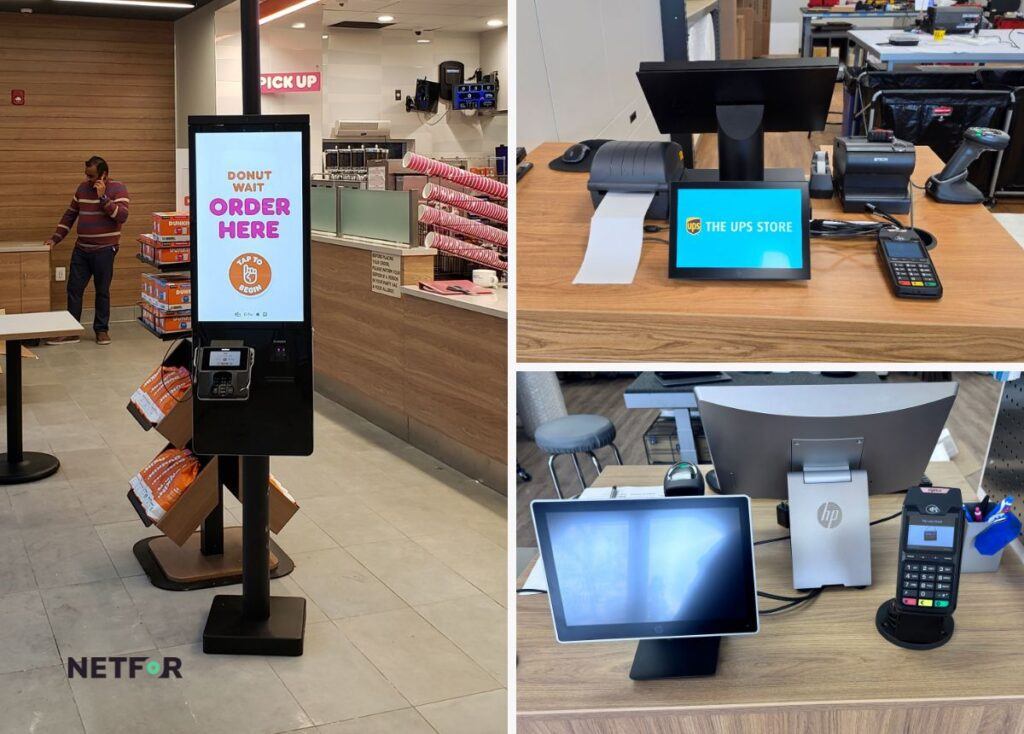
- Hardware positioning and wiring: Mounting the terminal or kiosk, connecting the pin pad, receipt printer, cash drawer, and any peripheral devices, and routing cabling cleanly and in compliance with site requirements
- Network and software configuration: Connecting the terminal to the store network, configuring POS system software, mapping merchant IDs to the payment gateway, and establishing network segmentation so POS traffic does not share bandwidth with guest Wi-Fi
- System verification and testing: Running end-to-end transaction tests, verifying receipt printing, confirming payment processor connectivity, and testing failover scenarios before the system goes live
- Staff training: Walking store staff through daily operations on the new system, including opening and closing procedures, common error handling, and escalation paths for technical issues
For anyone who has gone through choosing the right POS system for their business, the hardware and software decision probably felt like the hard part. In practice, installation is where the real execution risk lives.
How Do You Install a POS System Without Shutting Down a Store?
At a single location, a coordinated installation team can execute a complete POS setup during off-hours or a scheduled low-traffic window and have the store operational by opening. The math is manageable. The variables are contained.
At multi-location scale, that math breaks down fast. Multiplying a single-site installation timeline by store count does not account for the coordination complexity that emerges when you are managing rollouts across regions, multiple vendor relationships, and varying site conditions simultaneously.
A full multi-location rollout typically runs two to six weeks depending on site complexity. Complex chains with large store counts or mixed hardware environments can require six to eight weeks or longer. That timeline assumes a reasonably coordinated process. Without one, the same rollout can stretch to 18 to 24 months as individual sites get handled reactively, configurations drift between locations, and scheduling conflicts accumulate.
The vendor fragmentation problem compounds everything. Mid-market retailers and franchise operators managing rollouts internally often find themselves coordinating with 12 or more regional vendors across a national footprint. That coordination work alone can consume roughly 40% of internal IT leadership's time, time that would otherwise go to higher-priority strategic work (Compugen).
A phased rollout structure reduces exposure. A practical sequence looks like this:
- Menu and software configuration completed centrally before any hardware ships
- Integration testing against the live payment processor and back-office systems
- Hardware installation and staff training executed site by site within defined windows
- Soft launch with a support escalation path active before full go-live
Without that structure, the reasons multi-location POS rollouts fail are predictable:
- Shipping and logistics bottlenecks that delay hardware delivery across regions
- Scheduling conflicts between regional vendors with no central coordination layer
- Configuration drift between locations when there is no standardized playbook guiding each install
- No single point of accountability when something goes wrong mid-rollout
Point of sale service for multi-location brands is a discipline, not just a task. Operators who approach it that way complete rollouts faster and with fewer repeat dispatch events.
What Is the Difference Between Installing a Retail POS and a Restaurant POS System?
The core hardware components of a POS system look similar across retai storesl and restaurant environments: a terminal, a payment device, a printer, network connectivity. The configuration requirements are meaningfully different, and treating them the same way causes avoidable delays.
Retail POS installations are typically built around fixed terminals with wired Ethernet connections, barcode scanners, and cash drawers. Network configuration focuses on stable, segmented connectivity and PCI DSS compliance for cardholder data. The installation workflow is relatively linear.
Restaurant POS systems add significant complexity. Kitchen display systems (KDS) need to be installed and mapped to ordering stations. Tableside payment terminals require both physical placement and network configuration. High-density wireless networks become a requirement rather than a convenience, because multiple devices are transmitting simultaneously across the floor and kitchen. Staff training is more involved because the system touches more roles.
Mobile POS (MPOS) systems introduce a third category. A mobile POS system is a point-of-sale solution that runs on a handheld or tablet-based device instead of a fixed terminal. MPOS adoption is growing quickly across both retail and restaurant markets, with the majority of operators now incorporating mobile or handheld ordering tools into their environments. Retail operators using MPOS report meaningful reductions in checkout times. Restaurant operators see similar gains in order processing speed.
The staging requirements for MPOS differ significantly from those for fixed terminals:
- Charging stations and battery management for handheld device fleets need to be specified and installed before devices arrive on-site
- Mobile Device Management (MDM) enrollment must be completed before devices ship so they are configured and policy-compliant on arrival
- Wireless network testing to confirm encrypted, tokenized transaction processing at every point in the coverage area
- Continuous connectivity planning including cellular or SD-WAN failover, since MPOS systems depend on cloud connectivity in a way that fixed terminals with local fallback do not
Treating a restaurant POS system rollout like a retail terminal installation, or assuming MPOS deployment follows the same steps as a fixed-terminal installation, consistently results in scheduling overruns and post-go-live support tickets.

What Are the Most Common POS Installation Failure Points?
Most failed POS installations are not caused by defective hardware. A large share of "No Fault Found" returns, where hardware is sent back and diagnosed as working correctly, trace back to setup errors or environmental issues rather than manufacturing defects. The hardware was fine. The installation was not.
The most common preventable failure points fall into a recognizable pattern:
- Missing parts or peripherals on arrival: Technicians arrive on-site without the correct cables, mounting brackets, or drivers for the specific hardware configuration
- Technicians not certified on the specific POS software or hardware: General low-voltage or cabling contractors can handle the physical install but are typically not equipped for POS-specific imaging, configuration, or software-side verification
- Incorrect site information or access details: A technician who cannot access the server room or does not have the correct network credentials loses the installation window entirely
- Incomplete work orders: Gateway credentials not included, merchant IDs not mapped in the payment processor before install day, network segmentation not configured in advance
- Scheduling that does not account for site complexity: A kiosk install that requires three hours gets scheduled in the same window as a single-terminal retail install
Network segmentation and payment processor configuration are pre-install tasks, not day-of tasks. When POS traffic shares a network with guest Wi-Fi and no segmentation has been set up, the resulting interference and compliance exposure creates problems that persist long after the installation team has left. The cost of IT downtime in retail and QSR environments is well-documented, and most of it is preventable with better pre-install planning.
Understanding who installs your hardware after the sale is a question worth asking before rollout day, not after.
How Does Netfor Execute Multi-Location POS Rollouts?
Netfor's field services team approaches multi-location POS installation as a coordinated system rather than a series of individual site visits. The difference in outcome is measurable.
The process begins at the depot, not the store. Devices are imaged, MDM-enrolled, and validated before they leave the staging facility. By the time hardware arrives at a store, it is configured to that location's specifications and ready to use. Staff do not need to wait for on-site configuration. The installation team arrives to mount, connect, test, and train, not to set up devices that should have been staged centrally.
Coordinated field execution at this level consistently achieves SLA guided installation windows. Fragmented vendor models, where regional installers are scheduled and managed separately for each location, routinely run two weeks or more per site.
Netfor's field services approach also targets First-Time Fix Rates (FTFR) in the 95 to 97% range. FTFR measures the percentage of installations or service calls resolved without a repeat dispatch. Industry average for field service providers sits closer to 75 to 80%. The gap between those numbers represents direct cost, in the form of repeat truck rolls, and indirect cost, in the form of extended downtime and customer experience impact.
What a coordinated rollout model delivers:
- Pre-staged, store-ready devices that eliminate on-site configuration time
- Standardized configuration across every location based on a validated playbook
- One point of accountability instead of a fragmented network of regional vendors
- Predictable timelines at national scale rather than schedules that slip location by location
For IT Directors overseeing a fleet-wide POS replacement, that single point of accountability matters as much as the timeline. Coordinating 12 separate regional vendors across a national rollout is not a scalable model, and the accountability gaps between vendors are where rollouts stall.
Should You Use POS System Installers or Handle Installation In-House?
There is no single right answer to this question. The right approach depends on the number of locations, the geographic footprint, internal IT capacity, and how much schedule risk the organization can absorb. Here is how the three main options compare:
In-house IT or facilities teams
- Workable for a small number of locations in a single market
- Fully loaded technician costs and travel time climb quickly as location count grows
- Internal teams carry competing priorities, and POS rollout work competes with daily support obligations
- Ramp time for a fully onboarded internal hire: 6 to 12 months
Independent or regional POS installers
- Can execute a single-site install competently
- Rarely offer a standardized playbook or consistent configuration methodology across locations
- Lack the nationwide scheduling infrastructure multi-location brands need
- Accountability gaps emerge when a regional installer's work does not meet the standard set by a different vendor in a different region
Coordinated field services partner like Netfor
- Centralizes staging, scheduling, and accountability across every location
- Variable, scalable per-site fees rather than fixed internal overhead
- Ramp time of a few weeks versus 6 to 12 months for an internal hire
For a single-market operator with two or three locations, in-house installation may be the most practical choice. For any brand scaling past a single region, or replacing POS hardware fleet-wide, a coordinated field services partner typically reduces total cost, protects timelines, and removes the accountability risk that comes with managing multiple regional vendors simultaneously.
Nationwide field services and POS solutions services offered by coordinated partners exist specifically to fill the gap between a POS purchase decision and a working, revenue-generating system at every location.
Installation Is Where POS Rollouts Succeed or Fail
The hardware and software decision is important. But installation is where the investment either pays off or gets eroded by downtime, repeat dispatches, and inconsistent customer experiences across locations.
Multi-location operators who plan installation with the same rigor as the purchase itself, and bring in dedicated field execution when internal capacity is thin, protect uptime, control cost, and avoid the compounding problems that come from treating rollout as a plug-and-play task. A single day of extended downtime or a mismanaged multi-site rollout can cost more than a well-executed installation partnership would have from the start.
Netfor's field services team handles staging, imaging, and nationwide dispatch as a coordinated system. IT and Service Delivery Directors get consistent execution and a single point of accountability without adding internal headcount or managing a fragmented network of regional vendors.
If you are planning a multi-location POS rollout, explore Netfor's Field Services capabilities to understand how coordinated execution protects your timeline and your stores.