
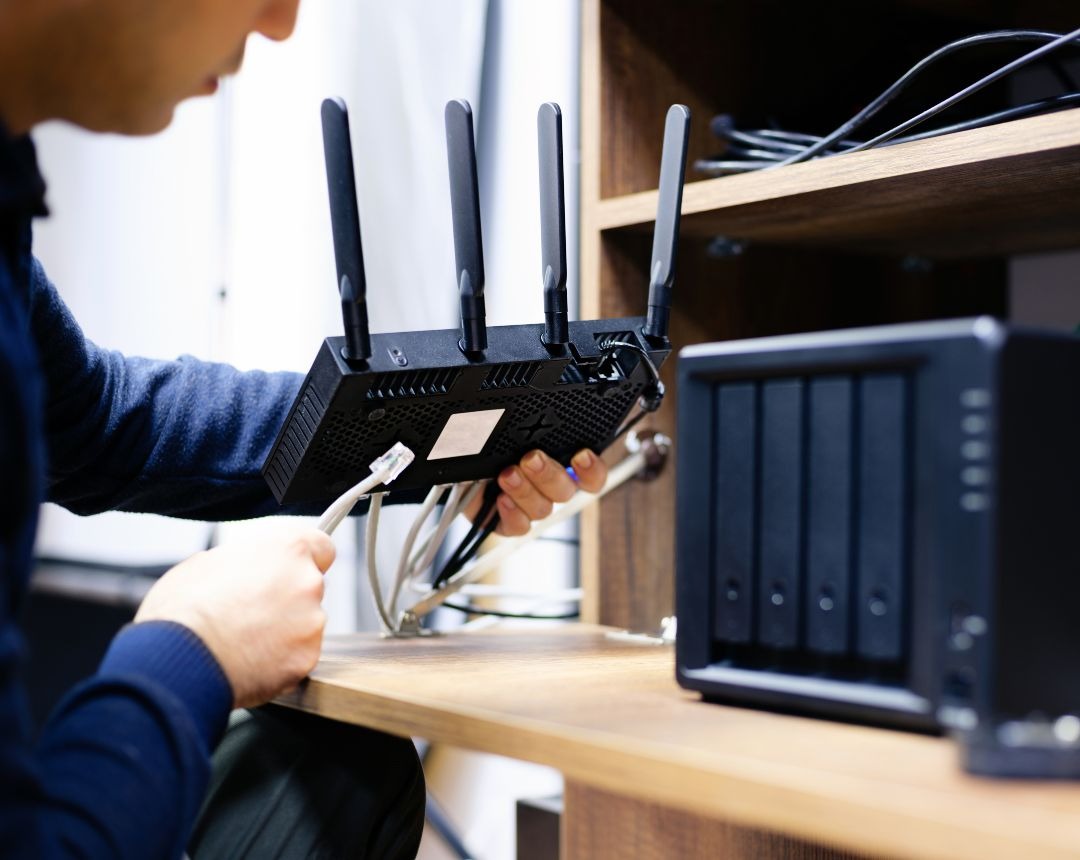
Business wifi installation is the process of designing, deploying, and configuring a wireless network built for commercial demands. It includes a site survey, access point placement based on device density and building layout, and network segmentation for POS systems, guest wifi, and security cameras. Unlike home wifi installation, commercial wifi installation accounts for interference, bandwidth competition between multiple device types, and consistency across multiple locations. A proper business wifi network installation prevents dead zones and network overload by planning capacity before equipment goes in the wall.
Most business wifi problems get blamed on bad equipment. The research says otherwise.
According to industry analysis from The Network Installers, physical hardware failure accounts for less than 5% of all commercial connectivity complaints. (THE NETWORK INSTALLERS, 2026). The real culprits are poor site surveys, under-provisioned access points, and networks that were never designed for the devices they are now carrying.
That matters because a commercial wireless network today is not just carrying email. A single physical network in a mid-size retail location now has to run POS transactions, stream continuous feeds from IP security cameras, serve guest devices, and support IoT equipment simultaneously. A setup built for basic staff browsing in 2015 was never designed for that load.
This guide explains what a proper wifi installation for businesses actually involves, what drives cost and timeline, and how to avoid the failures that come from treating a commercial space like a house. Whether you are opening a new location and need connectivity from day one, or managing a multi-location network that has outgrown its original setup, the information below will help you make the right call.
What Does Business WiFi Installation Involve, From Site Survey to Go-Live?
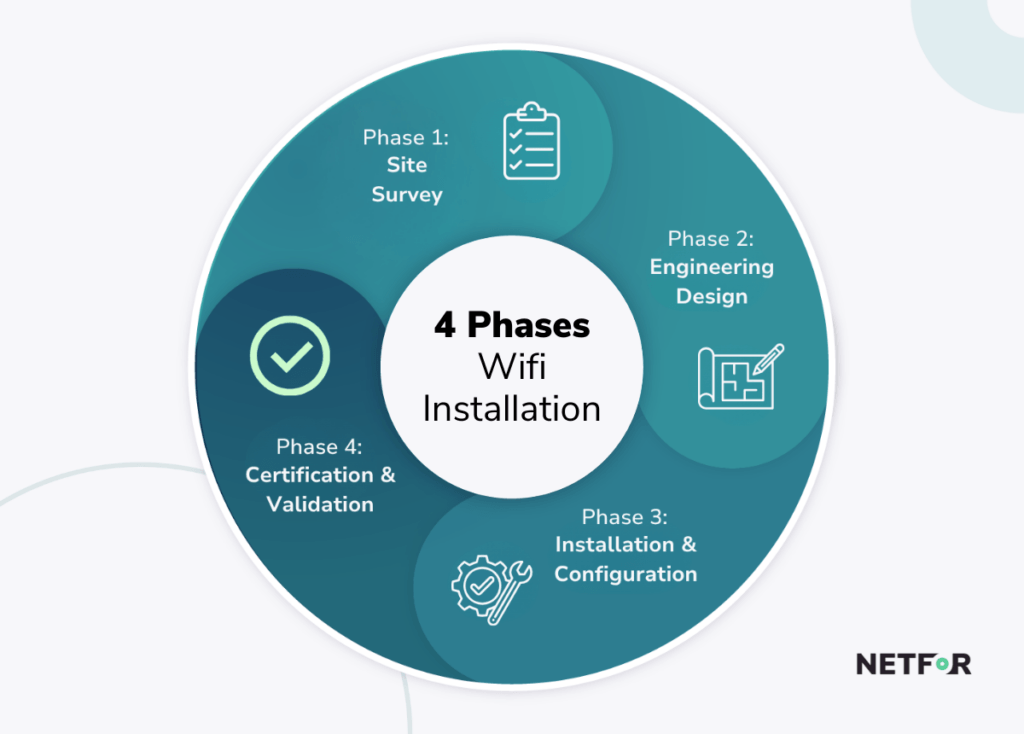
Business wifi installation follows a four-phase deployment lifecycle. Each phase has specific deliverables, and skipping any one of them is a direct path to the dead zones, roaming failures, and overloaded bandwidth that generate support tickets.
Here is what each phase covers for a single commercial site:
- Phase 1: Site Survey and Assessment - Technicians walk the facility, evaluate structural construction materials, count required access point drops, perform predictive RF (radio frequency) modeling, and confirm project scope.
- Phase 2: Engineering Design - Designers scale floor plan blueprints, generate predictive signal heatmaps using simulation software, calculate switch PoE (Power over Ethernet) budgets, and stage network equipment.
- Phase 3: Physical Installation and Configuration - Installers pull home-run Cat6/6A cabling, terminate patch panels, mount access points, deploy managed switches and firewalls, and configure VLANs (Virtual Local Area Networks) and QoS (Quality of Service) policies.
- Phase 4: Certification and Validation - Technicians certify cabling runs, perform post-installation active roaming surveys, optimize RF channel plans, and deliver as-built documentation.
Multi-location rollouts follow a different structure. The first two weeks focus on building a standardized hardware bill of materials, cloud controller management templates, and uniform VLAN and SSID security policies. A pilot site is then deployed in weeks 3 and 4 to validate POS transaction throughput, camera synchronization, and remote management tools before any regional scaling begins. Phased rollouts across multiple branches typically run 4 to 12 or more weeks in total. (ACCESS CABLING, 2025)
For businesses opening multiple locations, structured cabling is the foundation that everything else depends on. For a detailed overview of what that work involves, see Structured Cabling Installation: Find the Right Installer.
How Much Does Business WiFi Network Installation Cost?
There is no flat-rate answer. Commercial wifi installation costs scale by facility size, device density, building complexity, and the number of traffic types the network must carry. Vendors who quote a fixed price without a site survey are guessing.
Cost breaks down across four layers:
- Access point hardware
- Structured cabling
- Switching and routing infrastructure
- Labor
Cost Benchmarks by Business Size
- Small footprint (1,000 to 2,500 sq ft, 5 to 10 employees): $4,500 to $7,500 total for a basic setup with 2 to 3 access points, a managed PoE switch, and a security gateway (VERUS CORP, 2026)
- Mid-size (2,500 to 10,000 sq ft, 15 to 50 employees): $8,000 to $15,000 for 4 to 6 access points with multi-gigabit switches and next-generation firewalls.
- Multi-floor or complex retail: $12,000 to $25,000 due to advanced cabling pathways and enterprise compliance configurations.
- Multi-location rollouts: $5,000 to $15,000 per location, covering standardized hardware, cloud controller licensing, structured cabling, and site-acceptance validation (THE NETWORK INSTALLERS, 2025)
- Outdoor access points (patios, loading docks): $1,500 to $3,000 per unit, due to NEMA-rated weatherproof enclosures, OSP-rated shielded cabling, and grounded conduit requirements (ACCESS CABLING, 2025)
The most reliable per-project planning number is the fully installed cost per access point, which averages $650 to $1,400 per interior drop. (WCC TECHNOLOGIES GROUP, 2025). Access point hardware alone ranges from $150 for entry-level Wi-Fi 6 units to $700 for enterprise Wi-Fi 7 devices. (VERUS CORP, 2026)
The only way to know your real cost is a site survey. Netfor's field services team will walk your location and give you a number you can plan around. Get af flat-rate site survey here.
How Many Access Points Does a Business Need to Avoid Dead Zones?
The old rule of thumb, one access point per 2,500 square feet, fails in real commercial environments because building materials and device densities vary dramatically across facility types. (ACCESS CABLING, 2025)
Access Point Density Benchmarks by Environment
- Retail and showroom: 1 AP per 3,500 sq ft (WCC TECHNOLOGIES GROUP, 2025)
- Open-plan office: 1 AP per 2,500 sq ft.
- Private offices with heavy drywall partitioning: 1 AP per 2,000 sq ft.
- Healthcare facilities: 1 AP per 1,800 sq ft, accounting for concrete walls, lead-shielded imaging rooms, and medical IoT devices.
- Warehouses and distribution facilities: 1 AP per 8,000 to 15,000 sq ft, using directional antennas aimed down aisle pathways to overcome metal racking scatter (ACCESS CABLING, 2025)
Building materials are a variable that generic square footage rules ignore. Signal loss is measured in decibels (dB), where a bigger negative number means more of the wifi signal is blocked before it reaches the other side. Signal loss by material: (WCC TECHNOLOGIES GROUP, 2025)
- Drywall and sheetrock: -1 dB to -2 dB (minimal impact)
- Clear glass: -2 dB to -3 dB
- Brick and masonry: -6 dB to -10 dB
- Concrete and cinderblock: -10 dB to -18 dB (severe degradation)
- Metal warehouse racking: -12 dB to -20 dB
A concrete-walled retail location needs a different design than an open-plan office of the same square footage. A flat density rule that ignores wall material produces dead zones, regardless of hardware quality.
It is worth repeating the core finding: over 95% of commercial wifi complaints trace back to site survey failures, inadequate RF planning, or backend network issues, not defective equipment. Dead zones are design failures. Access point selection decisions directly affect this outcome, and the Aruba Access Point Installation: A Guide for IT Teams covers equipment-level considerations in detail.
How Is Commercial WiFi Installation Different From Home WiFi Setup?
The core difference comes down to network segmentation. A home network runs everything on a single flat network because there is no payment data to protect, no regulatory compliance requirement, and no simultaneous bandwidth competition between 16 cameras and a POS terminal. Commercial environments have all three.
VLAN Segmentation: The Architecture Home Routers Cannot Support
VLAN (Virtual Local Area Network) segmentation divides a single physical network into isolated logical networks, each with its own traffic rules, security policies, and bandwidth allocations. Consumer routers do not support VLAN mapping, advanced QoS engines, or PoE delivery. They were simply not built for it. (VERUS CORP, 2026)
Here is how each traffic type must be handled in a properly segmented commercial network:
- POS traffic: Low bandwidth, but requires top priority and zero delay. Any lag in payment processing is immediately visible to customers. (ACCESS CABLING, 2025)
- IP security cameras: A handful of 4K cameras running continuously can generate enough traffic to slow down the entire network if they're not isolated onto their own dedicated bandwidth. (THE NETWORK INSTALLERS, 2026) For more on camera network integration, see How to Choose a Commercial Security Camera Installer: A Buyer's Guide for Multi-Location Businesses.
- Guest wifi: Must be rate-limited and isolated, so guest devices cannot see or communicate with each other or with internal business systems.
- IoT devices: Smart thermostats, sensors, digital signage, and door locks belong on their own isolated network. Many of these devices have weak built-in security, so isolation is not optional.
- PCI-DSS compliance: Businesses processing card payments over wifi must comply with PCI-DSS (Payment Card Industry Data Security Standard). This requires POS traffic to run on its own separated network, fully walled off from guest and IoT traffic. (VERUS CORP, 2026)
On encryption, WPA3-Enterprise is now the standard for networks handling payment data. Older WPA2 security no longer meets PCI-DSS requirements.
Purple is one example of a guest wifi platform built for commercial venues, with isolation and compliance handled automatically. Spectrum Business and Comcast Business are common choices for internet installation, but that's a different service. An ISP (Internet Service Provider) delivers the internet connection. A wifi installer builds the network that runs on top of it.
What Should You Look for When Hiring a WiFi Installer for Businesses?
Not every contractor who can pull cable and mount an access point qualifies as a commercial wifi installer. The distinction matters, because the decisions made before a single cable goes in the wall determine whether the network performs reliably for years or generates support calls within months.
What Separates a Specialized Commercial Installer From a Generic Contractor
Specialized commercial installers like Netfor plan everything out before they touch a wall. Generic contractors often just eyeball it and guess based on square footage. Before you sign a contract, here's what to look out for:
- A qualified installer will survey your space ahead of time to see how signal strength travels through your walls and floor plan, so they know exactly where equipment needs to go before any cabling is run. (ACCESS CABLING, 2025)
- They also test every cable they install to make sure it can handle the job, and they'll hand you a report proving it.
- Once everything is mounted, a qualified installer walks the space again to confirm the coverage actually works in the real world, not just on paper. That means checking that you can walk from one end of the building to the other without your device dropping connection or lagging.
For businesses with more than one location, consistency matters just as much. Using a different local contractor at every site leads to mismatched equipment and setups that don't talk to each other, which becomes a headache to manage and a security risk down the line.
Netfor's Field Services team solves this with a national network of vetted technicians who follow the same process at every location, so every site gets the same quality installation. For businesses in locations where a standard wifi setup isn't practical, the Starlink Installer Guide: Setup, Services, and Scaling covers backup and alternative connectivity options for internet access.
Professional Installation vs. DIY: The Real Cost Comparison
DIY commercial wifi equipment costs $500 to $1,500 upfront. What that price doesn't include is what happens when the setup fails once real business traffic hits it.
Consumer routers and off-the-shelf equipment aren't built to keep different types of traffic separated or prioritized the way a business network needs. That means POS systems and guest devices can end up sharing the same open network, which is a serious security problem. Consumer equipment also tends to lose bandwidth and drop connections once security cameras start streaming all day. (THE NETWORK INSTALLERS, 2026)
When a DIY setup fails, fixing it costs a lot more than the equipment did. It usually means ripping out cabling and redoing the whole install the right way, which can run $8,000 to $20,000 or more. (VERUS CORP, 2026)
The bigger risk isn't the cost of fixing it. It's what can happen before you notice something's wrong. An unsecured network gives hackers an easy way in, and from there, a path to your customers' payment information. Data breaches at U.S. businesses average $10.22 million. (THE NETWORK INSTALLERS, 2026)
The math on DIY stops working fast.
Plan the Network Before You Buy the Equipment
Business wifi installation is capacity planning, not equipment shopping. Access point count and cost follow device density, building materials, and traffic segmentation requirements. Square footage is a starting point, not a design specification.
The businesses that avoid dead zones, compliance failures, and costly re-engineering are the ones that start with a site survey rather than a hardware order. For multi-location operators, the additional layer is standardization: one bill of materials, one configuration baseline, and one installation partner executing the same validated process at every site.
Netfor's Field Services network installs and validates commercial wifi networks the way a specialized integrator does, including site surveys, structured cabling, VLAN configuration, and post-installation validation, standardized across every location. One partner, consistent execution, and documentation you can actually use.
Ready to get a site survey started? Visit the Netfor Field Services page to connect with the team.