

Aruba access points are enterprise-grade wireless networking devices designed to provide secure, scalable Wi-Fi coverage for businesses. Modern Aruba wireless access points support high-performance connectivity for cloud applications, mobile devices, POS systems, and multi-location operations. Successful Aruba access point installation requires proper network planning, structured cabling, device configuration, and onsite deployment expertise. For organizations operating across multiple locations, nationwide field service partners help standardize installations, reduce downtime, and ensure consistent wireless performance across every site. Businesses upgrading to Wi-Fi 6 or Wi-Fi 6E often use Aruba networks access points to improve scalability, speed, and operational reliability.Most businesses do not realize how much revenue, productivity, and customer experience depend on reliable wireless infrastructure until locations start experiencing outages, dropped connections, or slow point-of-sale systems.
Many organizations still rely on aging Wi-Fi 5 infrastructure, inconsistent wireless deployments, or fragmented local installers that create long-term support issues across multi-location operations. As digital demands grow, these older networks struggle to keep up. The global enterprise WLAN market grew to $10.5 billion in 2025, driven by strong Wi-Fi 6E and Wi-Fi 7 adoption (IDC, 2025). In fact, Wi-Fi 7 represented nearly 40% of enterprise AP revenue by the fourth quarter of 2025 (IDC, 2025).
Network downtime can cost businesses between $5,600 and $9,000 per minute depending on company size and industry (Ponemon Institute, 2025). Modern Aruba Access Points combined with standardized nationwide field service deployments help businesses improve wireless performance, reduce downtime, simplify IT operations, and create a scalable infrastructure foundation across every location.
What Are Aruba Access Points and Why Are Businesses Upgrading?
If you want to know what is an Aruba wireless access point, the answer is straightforward. It is an enterprise-grade device that provides secure, high-speed wireless connectivity for businesses. These devices manage wireless traffic, connect multiple devices to your core network, and offer cloud-managed networking capabilities for centralized control.
Many businesses are replacing older infrastructure because Wi-Fi 5 has severe limitations. Older access points struggle with device congestion, cloud application demands, and the rapid growth of Internet of Things devices. Security modernization is also a major factor. As cyber threats evolve, legacy networks lack the tools to protect sensitive data.
Upgrading to modern Aruba Access Points provides massive benefits. Devices supporting Wi-Fi 6 and Wi-Fi 6E deliver faster throughput, better roaming between access points, and improved overall reliability. They feature AI-powered optimization that adjusts settings automatically for better performance in dense environments. Technical specifications show that Wi-Fi 7 throughput can exceed 4.2 Gbps. The 6 GHz spectrum expansion provides cleaner channels, and multi-gigabit uplink support ensures data moves quickly.
When should businesses upgrade their Aruba wireless access points? You should upgrade when your current network causes operational delays or when you add new bandwidth-heavy technologies. Common examples include retail stores deploying mobile POS systems, franchise environments managing hundreds of connected devices, and warehouses using handheld inventory scanners to track stock in real time.
Aruba Access Point Installation Is More Complex Than Most Businesses Expect
The Aruba access point installation process requires meticulous planning. It involves site surveys, RF design, cabling, physical mounting, testing, and configuration. Many businesses underestimate the physical requirements needed to support modern enterprise wireless networking.
One major factor is structured cabling. To get the most out of your Aruba Access Points, Cat6A cabling is critical. Older cables cannot handle the data speeds or the Power over Ethernet requirements of modern access points. Thermal considerations are also important. Cat6A cables lose less power to heat compared to Cat5e cables. You must also respect cable distance limitations, as structured cabling cannot exceed 90 meters without signal degradation.
Before deployment starts, businesses need to make sure their physical infrastructure can properly support modern Aruba wireless access points across every location.
- Test all existing cabling before deployment begins.
- Verify network switches can provide enough power to support modern access points through the Ethernet cable.
- Use the correct mounting brackets for ceiling-mounted Aruba access points.
- Install ruggedized hardware in warehouse or industrial environments exposed to dust, heat, or impact.
- Schedule after-hours installations for retail stores to avoid disrupting customers and operations.
- Properly terminate Cat6A cabling to support high-speed wireless performance.
- Use higher-capacity power standards for newer Wi-Fi 6E and Wi-Fi 7 access points that require additional electrical output.
- Secure devices correctly to ceiling grids for optimal wireless signal coverage and projection.
Using an experienced Aruba access points installer like Netfor helps you avoid common deployment mistakes. Take a look at the photos at the end of this blog for a full visualization of the rollout!
The Operational Challenges of Multi-Location Aruba Access Point Rollouts
How does Aruba access point installation work across multiple business locations? It requires coordination, standardized procedures, and consistent execution. Without centralized management, nationwide deployments often create long-term operational problems.
Relying on different local installers can lead to inconsistent cabling, mounting methods, and deployment quality. Missing documentation, scheduling delays, and poor closeout processes also create additional strain on internal IT teams.
Common Challenges in Multi-Location Aruba Access Point Rollouts
- Inconsistent installation standards between locations
- Missing deployment documentation and validation testing
- Scheduling delays that impact operations and store openings
- Increased troubleshooting and support burden for IT teams
- Poor long-term upgrade and lifecycle consistency
This is why businesses use nationwide field service partners for Aruba access point rollouts. Centralized project management helps standardize deployments, coordinate technician schedules, manage hardware staging, and ensure every location follows the same installation process.
Consistency matters long term. Standardized rollouts make troubleshooting easier, reduce support costs, simplify future upgrades, and help maintain reliable wireless performance across every location. Netfor achieves a 95% First Run Rate benchmark for these projects, with optimized install windows typically taking one to two hours per drop.
Security, Reliability, and Downtime Prevention with Modern Access Points
Wireless downtime creates major problems for multi-location businesses. When the network goes down, POS systems stop working, employees lose access to tools, and customers feel the impact immediately. Retail stores can lose transactions, healthcare locations can face delays in patient care, and enterprise operations can experience major productivity issues.
Modern access points help reduce these risks with stronger security and more reliable wireless performance. Features like network segmentation and identity-based access controls help separate POS systems, employee devices, guest Wi-Fi, cameras, and IoT equipment to improve both security and stability.
Newer wireless infrastructure also gives IT teams better visibility into network health. Cloud-based management platforms can identify failing hardware before outages happen, while AI-assisted optimization helps reduce interference and maintain strong connectivity during busy hours.
For multi-location businesses, modern access points are not just about faster Wi-Fi. They help reduce downtime, improve operational consistency, strengthen security, and support the growing number of connected devices across every location.
Real-World Aruba Access Point Installation Example from Netfor
To understand the value of nationwide field services, consider a recent Aruba access point installation completed by Netfor for Nespresso retail stores.
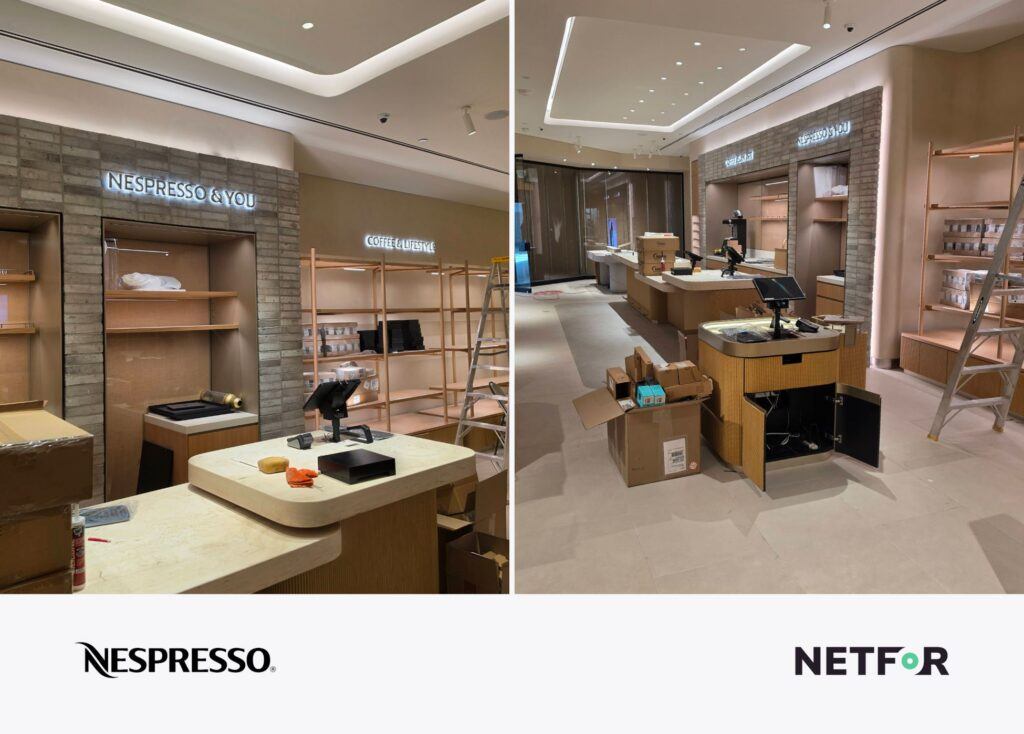
The location was a new retail store still under renovation. The store required wireless infrastructure to be installed before opening to support both front-of-house customer operations and back-of-house inventory connectivity. Netfor coordinated the dispatch and installation process. This included technician check-in procedures, scope validation, onsite communication, and deployment standards.

The scope of work included the physical mounting, connection, and activation of three Aruba Access Points. Two devices were slated for 12-foot hard ceilings in the customer areas. One device was planned for an ACT drop ceiling in the back room. The store already had existing Cat6 cabling installed.
During the installation, the field technician realized that the mounting hardware for two of the access points was missing from the site. Instead of halting the project, the technician adapted onsite. They used compatible mounting materials from their vehicle to complete the installation without delaying the store opening. Additionally, the technician identified that one Cat6 connection was not terminated correctly. They completed the termination onsite so the Aruba Networks Access Point could connect properly, the first time.

All three Aruba Access Points were successfully mounted, connected to the network, and operational during a single visit. Wireless coverage was restored and available before site turnover.
Nationwide field service projects sometimes don’t go exactly as planned. The difference is having technicians, project coordination, and deployment standards in place to solve issues onsite without delaying the rollout.
Comparing Enterprise Wireless Solutions
Choosing the right wireless access point depends on your business size, security requirements, operational complexity, and long-term growth plans. Some businesses prioritize low upfront costs, while others need enterprise-grade security, centralized management, and high-density performance across hundreds of locations.
When comparing modern enterprise wireless solutions, businesses should evaluate:
- Cloud-managed vs on-premises management options
- Long-term licensing and subscription costs
- Security and network segmentation capabilities
- Performance in high-density environments
- Scalability across multiple locations
- Visibility and centralized monitoring tools
- Support and deployment flexibility
- Compatibility with existing network infrastructure
Budget-focused organizations may prioritize simpler deployments with minimal recurring costs, while larger enterprises often require stronger security controls, centralized management, advanced analytics, and consistent performance across distributed environments.
The best wireless solution depends on how your business operates today and how it plans to scale in the future. Regardless of which platform fits your environment best, nationwide deployment consistency matters just as much as the hardware itself. Netfor supports nationwide installation, rollout coordination, structured cabling, and field service deployments for a wide range of enterprise wireless access point solutions.
The Business Case for Upgrading Your Wireless Infrastructure
Wireless infrastructure is now mission-critical for multi-location operations. Outdated Wi-Fi causes operational bottlenecks, connectivity issues, and inconsistent user experiences. Upgrading to Aruba Access Points provides the scalability, security, and performance improvements your business needs.
However, mounting the hardware is only one step. Standardized deployments reduce long-term operational problems. Nationwide field service coordination improves rollout consistency and speed. Modern Aruba wireless deployments improve uptime, employee productivity, customer experience, and operational scalability.
Netfor combines nationwide field service capabilities, structured cabling coordination, project management, and multi-location rollout expertise to help organizations modernize wireless infrastructure consistently across every site. If you need a reliable Aruba access points installer for your next major project, we have the resources to help.
Learn more about our capabilities and request a consultation for your deployment by visiting our Field Services page today.