


Your Patients Are Calling.
Is Anyone Picking Up?
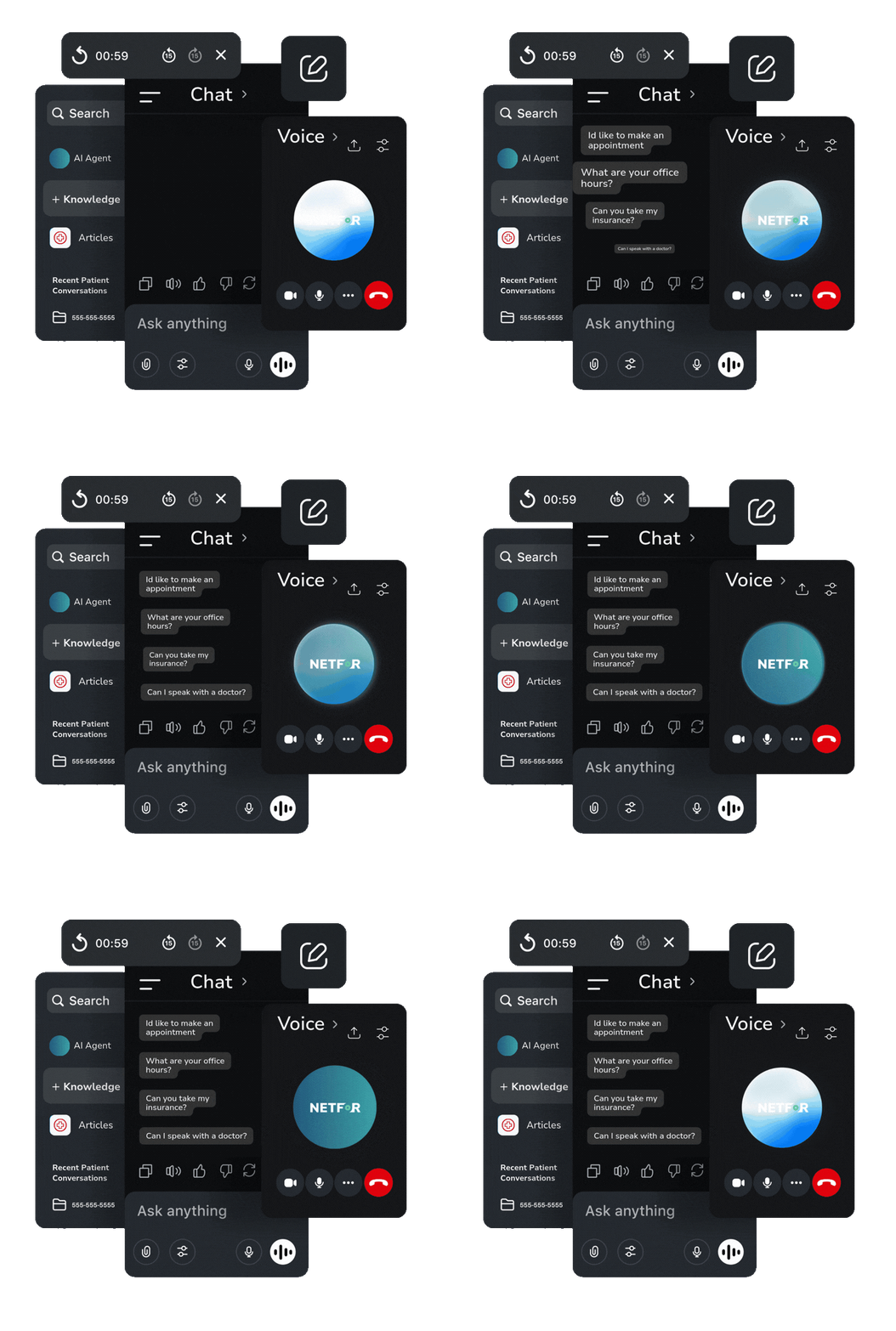
Netfor manages inbound patient access for pain management practices with AI-powered intake, scheduling, and smart routing, helping your front desk keep up with hundreds of patient calls without adding staff as demand grows.
Not a chatbot. Not an answering service. A managed patient access operation built for pain management practices.
/
/
Patient Access Coverage
%
Appointment Calls Successfully Booked by AI Agent
x
ROI Within the First Month









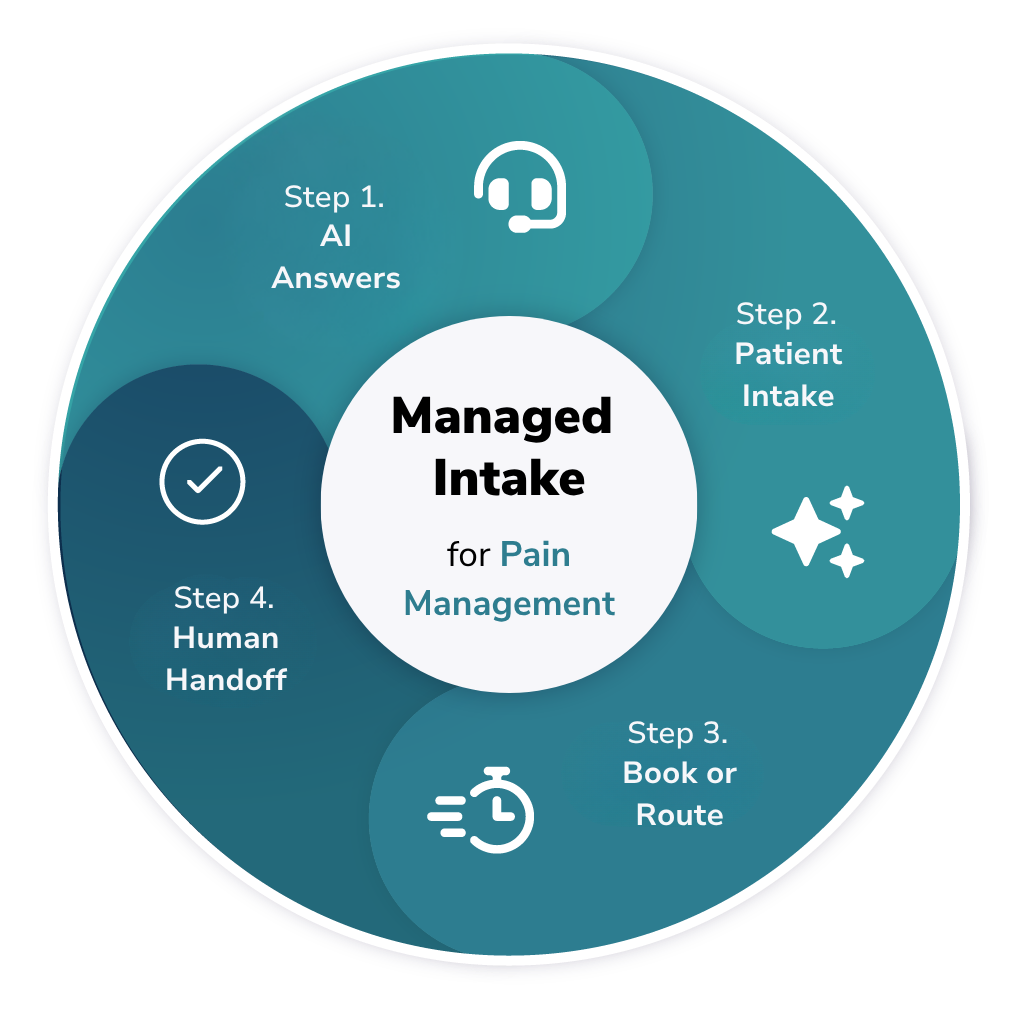
How It Works
Keep patients moving from call to care.
AI Answers & Captures Intake
Patients explain what they need while AI captures demographics, insurance, referral source, procedure, and visit reason.
Books Appointments Directly
Patients can book eligible appointments directly into your EHR and leave the call with a confirmed appointment, not a callback promise.
Routes Patients to the Right Place
When a call needs your team, the AI routes it appropriately with the information already collected.
Hands Off With Full Context
Clinical, urgent, or complex calls transfer to your staff with a verbal summary, so patients don't have to start over.
Our Capabilities
Built for Real Pain Management Patient Access
Every capability below is live today, not a roadmap item.
AI Patient Intake
Captures patient information, determines intent, and routes scheduling, procedure, and other requests appropriately.
EHR Scheduling & Integration
Connects with your EHR to check availability and book eligible procedures and follow-ups directly.
Intelligent Call Routing
Replaces rigid phone trees with natural conversation and routes callers based on what they need.
Patient Questions & Support
Handles routine patient questions using approved practice knowledge.
After-Hours Patient Access
Extends coverage beyond business hours with clear routing and patient messaging.
Human Escalation & Exceptions
Recognizes when AI should stop and transfers complex, clinical, or urgent calls with context.
Knowledge Management
Keeps the information behind your AI Agent accurate as providers, policies, and workflows change.
Managed AI Operations
Monitors, maintains, and tunes performance after launch.



“We wanted to make scheduling easier and more accessible for our patients while reducing the workload on our front desk team. By giving patients another way to schedule their appointments, our staff has more time to focus on the patients who need direct assistance and provide a better overall experience.”
Karolina Ojdanic | Director of Operations | The Pain Experts
Real Situations. Real Solutions.
Here’s how Managed Patient Access handles the calls pain management front desks field every day.
New Patient Calls to Schedule
The situation: A new patient calls with a referral for a pain management consult. They need to provide demographics, insurance, and referral details before an appointment can be booked.
How Managed Intake helps:
- Captures name, DOB, phone, address, referral source, PCP
- Collects insurance details and verifies required fields
- Books the appointment directly into the EHR
- Delivers arrival instructions
The result: Patient gets a confirmed appointment in one call. No callback needed. Complete intake on file before they arrive.
Established Patient Needs to Reschedule
The situation: An established patient calls to reschedule a follow-up. They're already in the system but staff still has to pull the chart, confirm identity, check for insurance changes, and find an open slot.
How Managed Intake helps:
- Confirms patient identity (name, DOB)
- Checks whether insurance has changed and only collects new coverage details if it has
- Captures appointment reason and service type
- Books the new appointment directly into the EHR
- Delivers updated arrival instructions
The result: Patient is rescheduled in one call. No redundant intake. Staff isn't interrupted for a task that didn't need them.
After-Hours Call
The situation: A patient calls at 7pm on a Thursday. The front desk is closed. Without a defined after-hours path, that call either dead-ends or rings until it drops.
How Managed Intake helps:
- Detects that the call is outside business hours
- Greets the caller with a clear after-hours message
- Routes the call to the designated after-hours service
- Documents the interaction and routing outcome
The result: No dead air. No missed patient. Every after-hours caller reaches a live destination with full context of when they called and why.
Patient Reports a Clinical Concern
The situation: A patient calls with a clinical concern, such as new symptoms, increased pain, medication questions, or concerns following a procedure. The call needs to reach the appropriate clinical staff.
How Managed Intake helps:
- Captures patient identity and reason for calling
- Records the information the patient provides
- Recognizes the request requires clinical staff
- Warm-transfers the call with a verbal summary
The result: The AI does not evaluate symptoms or make clinical decisions. Your staff receives the call with context already collected, helping the patient reach the right person faster.
Caller Asks for a Live Person
The situation: A caller doesn't want to interact with AI. They say "I just want to talk to someone" and they mean it immediately, not after completing three more prompts.
How Managed Intake helps:
- Recognizes the transfer request at any point in the call
- Exits the current workflow immediately
- Transfers the caller to the front desk
- Provides a vocal summary to staff where applicable
The result: The caller gets a human, fast. No trapped experience, no frustration loop. The AI gets out of the way when it's supposed to.

How We’re Different
What Competitors Focus On
- "Automate Everything"
- Chat And Messaging Only
- Generic "AI Agent"
- Setup In Hours (Overpromise)
- Technical Jargon
- “We’re #1, Most Powerful”
What Netfor Delivers
- AI Handles Routine Intake So Your Staff Focus on Exceptions
- Voice, Chat, SMS — Wherever Your Patients Reach Out
- AI Built for Real Patient Access: Intake, Scheduling, Routing
- Realistic Implementation With Validation And Optimization
- Plain Language Your Whole Team Understands
- Honest Capabilities and Real Use Cases
See Exactly How AI Handles Your Patient Calls
We'll walk you through a live demo built around your call types - scheduling, after-hours, urgent symptoms, and more.
Why Netfor
AI built for patient access teams, not tech teams.

No Overpromises. Just Real Results.
We don’t claim setup in an hour or promise to replace your entire team. We help you handle more volume, prioritize better, and resolve issues faster with AI and humans working together.

Enterprise-Ready, Without the Complexity.
SOC 2, HIPAA, PCI compliance built in. Integrates with your existing phone system, EHR, and practice management platform. No rip-and-replace required.

Indianapolis-Based Teams Who Know Your Business.
30+ years supporting multi-location businesses means we understand specialty practice operations, front-desk challenges, and what happens when systems go down at 2 AM.

Clear Rules, No Black Boxes.
Our AI follows your business logic and escalation rules. You control what gets automated, what gets prioritized, and when humans step in.


Frequently Asked Questions
How long does implementation take?
For eClinicalWorks practices, pilot launch is typically 4–6 weeks from signed terms. For other cloud-native EHRs, 8–12 weeks including integration build. We validate, activate, and optimize — no shortcuts.
Will AI replace my front-desk staff?
No. Netfor handles routine intake and scheduling calls so your team can focus on exceptions, clinical questions, and complex patient needs. Your experienced staff do the work that actually requires a human.
What happens when the AI can’t handle a call?
The patient is immediately warm-transferred to your staff with a verbal summary of everything already collected. No dead ends. No trapped callers. Human escalation is always available.
How do you ensure AI doesn’t give wrong answers?
Our AI is scoped to structured workflows: intake, scheduling, routing. It does not diagnose, prescribe, or provide clinical advice. Business rules and escalation logic are defined by you and enforced by the system.
Which EHR systems do you support?
eClinicalWorks integration is live and proven. We are actively expanding to other cloud-native EHR platforms including ModMed, DrChrono, and athenaOne. If your EHR has API access, we can likely integrate.
Is my patient data secure?
Yes. SOC 2 Type II, HIPAA, PCI DSS certified. We execute a BAA as standard. Full audit trails on every interaction. 100% of conversations captured for compliance and quality assurance.